

AI for your garage. Ask it, scan it, price it.
BOOKAR GMS has three AI tools built in, and each does one job. The AI Assistant answers questions about your garage. Document Scanning reads supplier paperwork so nobody has to type it in. Smart Jobs turns “front brakes” into a priced job. All three work on your own data, and none of them makes up a price.
Ask your garage a question
Type a question the way you would ask the office. The assistant looks it up in your own records and answers with the figures, plus a table or chart when that helps. It only reads your data. It never changes anything.
Ask about anything in the GMS
The diary and free slots, work orders, invoices and payments, who owes what, sales, technician hours, stock, purchase orders, suppliers, MOTs and services due, courtesy cars, reviews and more.
Answers you can check
Every answer links to the GMS pages that hold the records it read, so you can see where the figures came from.
Keep it as a report
Export an answer to Excel, CSV or PDF, or save it as a report and have it emailed daily, weekly or monthly. Each report runs on that day's figures, so you don't have to ask again.
From a quote to a work order
Ask what an MOT would cost a customer. It prices it from your own price list and offers a button that raises the work order with the job already on it.
Fault codes and technical data
With the technical data add-on, it can also look up a car in the manufacturer's data: what a fault code means, adjustment data, wheel-nut torque and tyre pressures.
Each person sees only what they can already open
The owner decides who can use it. Each person only gets answers from the parts of the system they are allowed to open. It can't read staff messages or private notes.
Example questions
“What's booked in for tomorrow?”
14 jobs across 4 bays. Bay 2 is free from 13:30, and two MOTs don't have a technician yet.
Based on Diary
“Who owes us the most?”
Five account customers owe £6,412 between them. The largest balance is £2,180, and it is 64 days old.
Based on Aged debtors
“Which work orders still need parts ordering?”
Seven, across both branches. Three have their parts on a purchase order that is still a draft and hasn't been sent to the supplier.
Based on Work orders · Purchase orders
“What does P0420 mean on AB12 CDE?”
Catalyst efficiency below threshold, bank 1. That is from the manufacturer's data for this car's engine.
Based on Technical data
Read from a supplier invoice
Check, then save- Supplier
- Matched to your list
- Invoice no.
- INV-448213
- Invoice date
- 24 Sep 2026
- Due date
- 31 Oct 2026
- PO number
- PO-1042
- GRN number
- GRN-7719
Lines
- Brake pad set, front×1£32.10
- Brake disc pair, front×1£61.80
- Oil filter×2£8.50
- Engine oil 5W-30, 5L×2£83.00
- Works from a PDF, a photo, a pasted screenshot or a browser tab
- Picks the supplier when the name matches one you already have
- Warns you when prices look like they include VAT
- Nothing is saved until you've checked it
Supplier paperwork, read for you
Stop typing invoices in line by line. Scan the document, check what was read, and save it. It works on supplier invoices, purchase orders and the work order, the three places supplier paperwork usually gets typed in by hand.
Supplier invoices and credit notes
Scan document on Supplier Invoices reads the supplier, the invoice number and dates, the PO and GRN numbers, the net, VAT and gross, and every line. Then it fills in the invoice for you to check.
Delivery notes
Photograph the note that came with the delivery, and it is read the same way.
Any supplier's cart
Ordered on a supplier's own website? Capture the browser tab or paste a screenshot of the cart. The parts go onto the work order or purchase order with cost and sell prices.
New parts become stock items
On a purchase order, any part with no matching part number is added to your inventory, so it can be ordered and received like the rest.
Type “front brakes”. Get a priced job.
Smart Jobs matches a few words to the car's OE repair operations. It takes the manufacturer's labour time at your rate and prices the parts live from your suppliers. You get one grouped job on the work order, ready to send for authorisation.
The AI has one narrow task: read the words and pick the right operation for this car. Labour times and prices come from data, not from the AI.
- 1
Match
Claude reads the phrase and picks from the repair operations TecRMI lists for this exact vehicle. "Cambelt" finds the timing-belt kit. "Front brakes" offers pads, then discs. You choose.
- 2
Quote
Labour is the OE time at your labour rate and OE-times mark-up. Parts are priced live from GSF, NAPA, or whichever is cheaper, and you can filter by brand, quality and stock. It is laid out like a parts website.
- 3
Add
One grouped job goes on the work order with its labour and parts lines, and you can edit it like any other job. "Often done with this" chips add related work and its parts in one click.
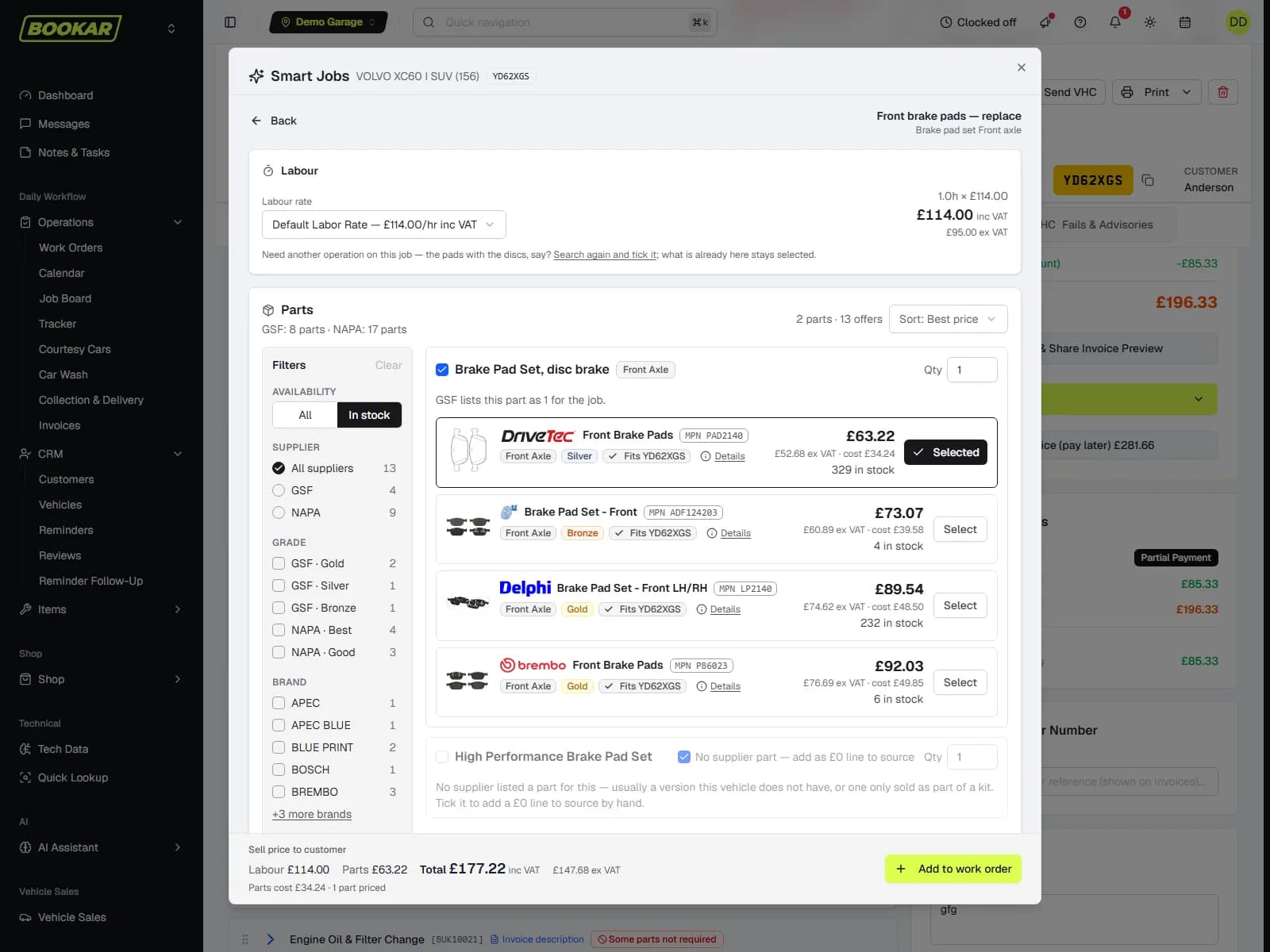
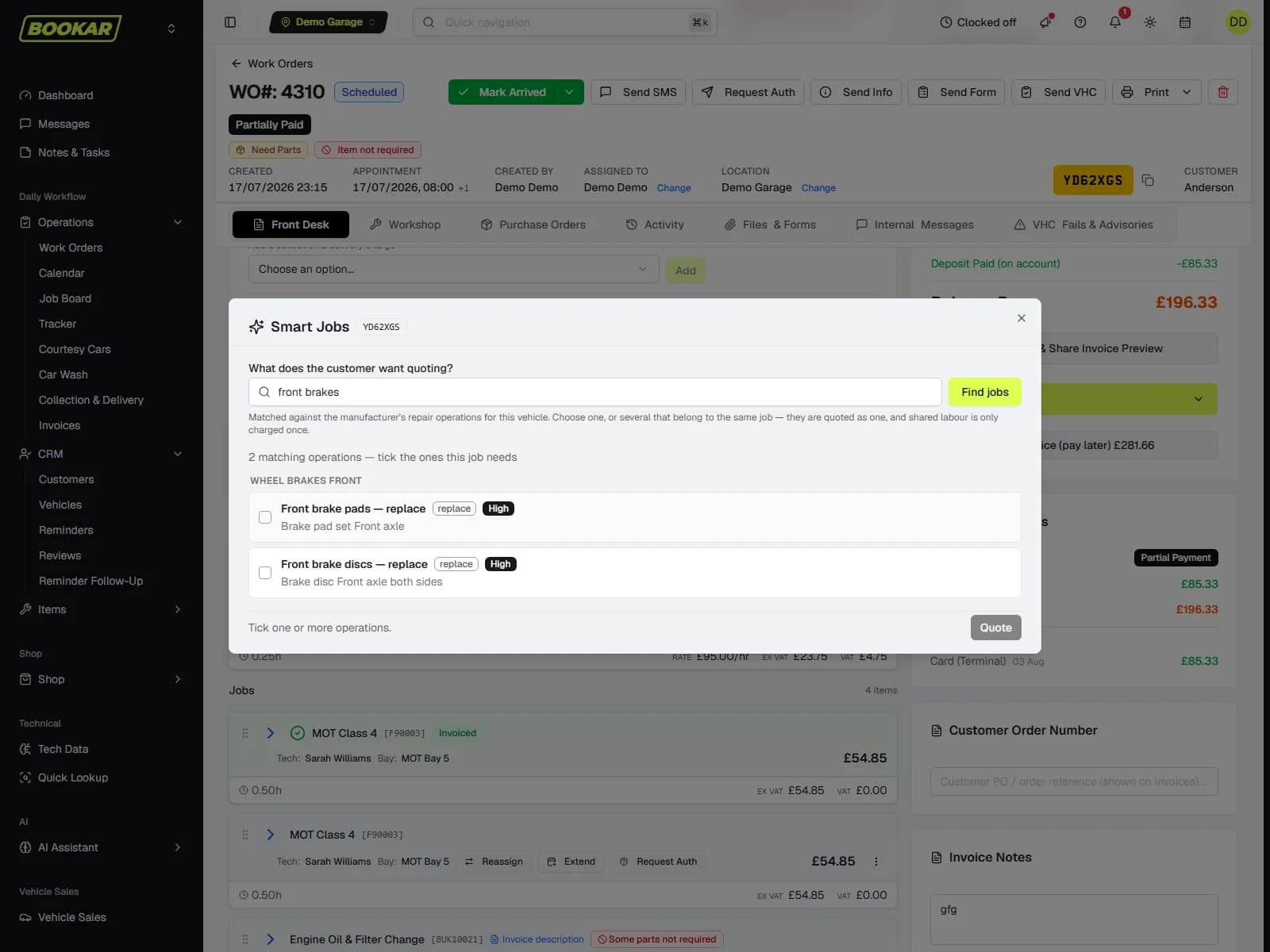
- Quotes the pair for an axle job, not left plus right
- Offers pads with a disc job, and never charges for a belt twice
- Uses the customer's agreed parts rate when they have one
- Works out engine oil from the car's oil capacity, not the price of a bottle
- Get Repair Times uses the same layout for a labour-only quote
AI that works where you already work
There's no separate tool and no extra login. Each one sits on the screen where the job is already done, and AI is only used where a simple rule can't do the job.
Inside the GMS
The assistant has its own page. Scanning is a button on supplier invoices, purchase orders and the work order. Smart Jobs is on the work-order toolbar and the Job Board.
You stay in control
You check scanned lines and Smart Jobs quotes before they are saved. The assistant only reads. It can't change a record or send a message.
Data first, AI second
Labour times come from TecRMI, prices from your suppliers and your own price list, and answers from your own records. The AI picks and reads. It doesn't make things up.
Common questions
Which are included, and which cost extra?
Smart Jobs is part of the GMS plan. The AI Assistant and Document Scanning are add-ons. Current prices are on the pricing page.
Does the AI make up parts or prices?
No. Smart Jobs only picks from the repair operations TecRMI lists for the vehicle. Labour times come from TecRMI, and parts prices come live from your supplier. The assistant prices work from your own price list, and every answer shows which records it read.
Can the AI Assistant change anything?
No. It only reads. If you ask for a quote, the answer can include a Create work order button. The work order is only raised if you press it, and your own permissions apply.
Who can use the AI Assistant?
At first, only the business owner. The owner can switch it on for other staff in Settings → Employees. Each person only gets answers from the parts of the system they can already open. It can't read staff messages or private notes.
What can Document Scanning read?
Supplier invoices, credit notes and delivery notes, from a PDF, a photo or a screenshot. It also reads the cart on any supplier's website. You check everything it read before it is saved.
What does Smart Jobs need?
GSF or NAPA connected, so it can get live parts prices. The OE labour times come with the GMS plan.
What if Smart Jobs is unsure?
It shows you the matches and you choose. Nothing goes on the work order until you add it, and you can edit every line afterwards, like any other job.
Is my data used to train anything?
No. The AI tools only work on your garage's own data. Nothing is shared between garages or used to train outside AI models.
See all three on your own garage
Bring a registration and a job, a supplier invoice, and a question about your business. We'll price the job, scan the invoice and answer the question while you watch.
Join Our Newsletter
Subscribe to receive the latest news, updates and software insights, directly to your inbox.