
A workshop app that just works - on everything
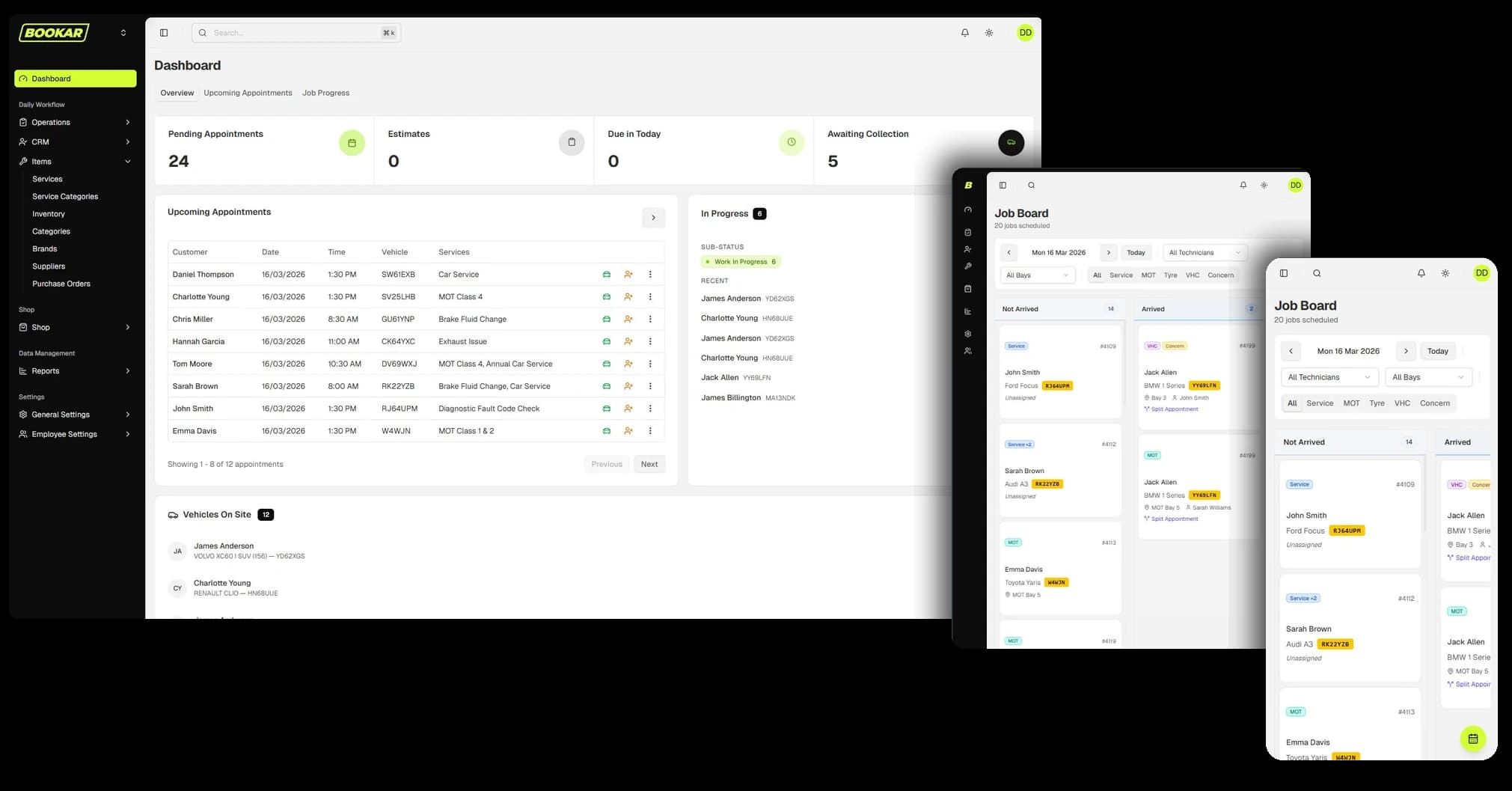
No app store. No clunky installs. No "which version are you on?". BOOKAR is a progressive web app — it looks and feels like a native application on every device your team uses, and it's always up to date.

Desktop
Windows & Mac
Tablet
iPad & Android
Mobile
iPhone & Android
Install once
Always up to date
The best of an app, without any of the hassle
A Progressive Web App is a website that behaves like a native app. It loads instantly, sits on your home screen or taskbar with its own icon, runs full-screen without a browser bar in the way — and works on any device without anyone visiting an app store or waiting for a download.
For a garage, that means your service advisors can pull up a work order on a desktop in reception, a technician can check their job board on a tablet in the workshop, and you can review reports on your phone from anywhere — all on exactly the same platform, with no version mismatches.
- Install directly from the browser — no app store required
- Launches from a desktop icon just like any native app
- Updates happen automatically — your team is always on the latest version
- Works on Windows, Mac, iOS, and Android
- Full-screen experience with no browser chrome in the way
Built to look as good as it works
Most garage software looks like it was designed in 2005 and never touched again. BOOKAR was built from scratch with a modern, clean interface — the kind your team actually wants to use. Fast, responsive, and visually sharp across every screen size.
Good design isn't cosmetic — it directly affects how quickly your staff can find what they need, how few errors get made under pressure, and how confidently new team members get up to speed. A well-designed system is a faster, more accurate system.
- Clean, uncluttered layouts that reduce cognitive load
- Consistent UI patterns so every screen feels familiar
- Designed for speed — common actions in as few clicks as possible
- Dark and light mode support
- Large touch targets for use in gloves or on workshop-floor tablets
Fast enough for a busy workshop floor
Slow software costs you time. When a technician has to wait three seconds for a job card to load, or a service advisor refreshes a booking twice because they're not sure it saved — that's friction. BOOKAR loads fast, responds instantly, and keeps up with the pace of a real workshop.
Instant load times
PWA technology caches key resources locally, so BOOKAR opens fast even on slower connections.
Real-time updates
Job status, availability, and customer data update in real time — no refreshing, no stale data.
Designed for speed of use
Common actions are one or two clicks away. Technicians, advisors, and managers all have tailored views that put the right things front and centre.
Secure by default
BOOKAR runs over HTTPS with role-based access controls, so sensitive customer and financial data stays protected on every device.
No IT department required
Traditional desktop software means licences to manage, versions to update, and compatibility issues to troubleshoot. BOOKAR eliminates all of it. There's nothing to install, nothing to update, and nothing to break.
No downloads
Add BOOKAR to your home screen or taskbar in seconds, directly from the browser. No app store, no waiting, no permissions saga.
Always up to date
Updates roll out automatically in the background. Your team starts the day on the latest version — without anyone doing anything.
Use any hardware
BOOKAR works on the devices you already own. Reception desktop, workshop tablet, manager's phone — all covered, no specialist hardware needed.
Low bandwidth friendly
PWA caching means BOOKAR stays responsive even when your workshop Wi-Fi isn't at its best.
Consistent across devices
The same interface, the same features, the same data — whether you're on a 27-inch monitor or a 6-inch phone screen.
Genuinely pleasant to use
Staff adopt tools they enjoy. A modern, well-designed system gets used properly — which means better data, fewer errors, and a smoother-running workshop.
Up and running in under a minute
Getting BOOKAR on any device is as simple as opening a link and tapping "Add to home screen". That's it.
- 1
Open BOOKAR
Visit BOOKAR in any modern browser — Chrome, Safari, or Edge — on any device.
- 2
Install the app
Tap 'Add to Home Screen' on mobile or 'Install' in the browser address bar on desktop. Done in seconds.
- 3
Launch from your icon
BOOKAR now opens from your desktop, taskbar, or home screen just like any native app — full screen, no browser bar.
- 4
Stay up to date automatically
Every time BOOKAR is updated, you get the latest version automatically. Nothing to manage, nothing to download.
Software your team will actually want to use
BOOKAR is fast, modern, and works on every device in your workshop — with nothing to install, nothing to update, and no IT headaches. See it for yourself.
Join Our Newsletter
Subscribe to receive the latest news, updates and software insights, directly to your inbox.