

WhatsApp for your garage. Every chat on the job.
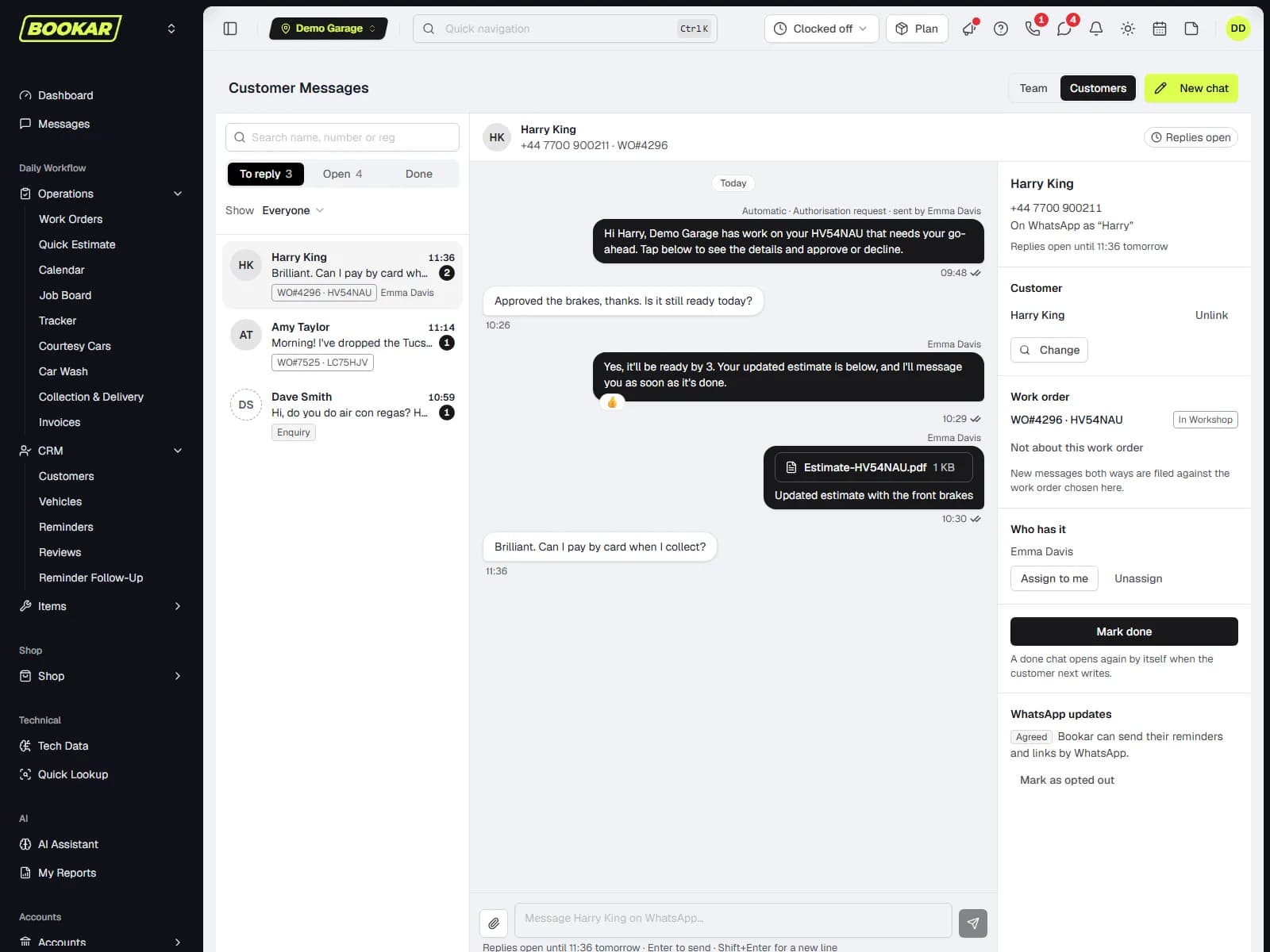
Your customers already use WhatsApp. With BOOKAR they can message your garage on it, and your team answers from BOOKAR, not from one person's phone. Every chat sits on the customer's record and the work order. The messages BOOKAR already sends, from authorisation requests to payment links, go by WhatsApp too, with a text as the back-up.
An add-on to the BOOKAR GMS plan.
Sarah Mitchell
WO#4821 · AB12CDE
Authorisation request
Hi Sarah, Smith's Garage has work on your AB12CDE that needs your go-ahead. Tap below to see the details and approve or decline.
09:15
View and approve
Approved the brakes, thanks. Is it still ready today?
09:31
Yes, it'll be ready by 3. We'll have a listen for that rattle while it's in.
09:35
Write a reply…
One WhatsApp inbox for the whole front desk
Customer chats sit under Messages, beside your team chat but kept apart from it, so an internal remark can never reach a customer. Everyone at the location who has access sees the same inbox, on a PC or on their phone.
To reply, Open, Done
Chats waiting for an answer come first. Mark a chat done once it's dealt with, and if the customer writes again it comes straight back.
Know who's handling it
Show everyone's chats, just yours, the unassigned ones or new enquiries. The first person to reply takes the chat, or you can take it with Assign to me.
Nothing missed
An unread badge in the header, and a notification to whoever is handling the chat or the people on the work order.
Find any chat
Search by name, company, number or registration, across open and finished chats.
Start a chat
Pick a customer by name, mobile or registration, or type a number. Nothing is sent until you write.
- Delivered and read ticks on every message you send
- Customers' reactions show on your messages
- Customers send photos, videos, voice notes and documents, and you can send files back
- Shows when WhatsApp's 24-hour reply window is open, and offers approved messages when it isn't
WO#4821 · Notes
WhatsAppSarah Mitchell09:32
Voice note (0:14)
WhatsAppSarah Mitchell09:31
Approved the brakes, thanks. Is it still ready today?
AuthorisationSarah Mitchell09:30
Approved: front brake discs and pads
WhatsAppFront desk09:15
Authorisation request sent
NoteTechnician08:52
Front discs below minimum, pads at 2 mm.
Every chat on the customer and the job
BOOKAR matches the number to the customer, whichever of their numbers they message from, and files the chat against their open work order. Anyone who picks up the job can read what was said, even when the person who said it is off today.
Matched to the customer
By their mobile, their landline or any other number on their record. A number BOOKAR doesn't know arrives as a new enquiry.
On the work order
WhatsApp messages appear in the work order's Notes, next to your notes and the customer's authorisation answers. Move a chat to a different job in one click.
From enquiry to work order
Create the customer and a work order from the chat, with their WhatsApp name and number already filled in.
WhatsApp wherever the number is
A WhatsApp button beside the customer's mobile on the work order and the customer record, and every chat on their Communication tab.
See the problem for yourself
Customers can send a photo of the warning light or a voice note of the noise. Send photos, estimates and documents back.
The messages you already send, now by WhatsApp
Authorisation requests, payment links, health check reports and reminders can go by WhatsApp instead of a text, with the same link. You choose which messages go by WhatsApp at each location.
- 1
Chat open
If the customer has messaged you in the last 24 hours, it goes as a normal WhatsApp message, with the same words and link as the text.
- 2
Chat closed
Outside that window, WhatsApp only allows approved message templates. BOOKAR sends the approved version, as long as the customer has agreed to hear from you on WhatsApp.
- 3
Otherwise, a text
If they haven't agreed, aren't on WhatsApp, or the message can't be delivered, BOOKAR sends the text instead, just as it does today.
Whichever way it goes, the message is logged on the customer's communication history, so reminder history and follow-up lists stay complete.
Send by WhatsApp at this location
Authorisation requests
Work that needs the customer's go-ahead, with a View and approve button.
Information shared
Photos, videos and notes about their car, with a View button.
Payment links
The bill and a secure link to pay it online.
Health check reports
The VHC report, with a View report button.
Customer forms
A form to fill in, with an Open form button.
Car ready to collect
Sent when you tell them the car is ready.
Appointment reminders
A reminder before the car is booked in.
MOT and service reminders
Reminders that ask them to reply to book.
Review requests and surveys
A review request or feedback survey after the visit.
Customers choose WhatsApp, and can stop it
WhatsApp only lets a business message people who have agreed to hear from it. BOOKAR records that agreement wherever it's given, and keeps to it.
They message you
A customer who messages your garage has agreed to hear back from you on WhatsApp.
A tick when they book online
"Send me updates about my booking on WhatsApp" when they book with BOOKAR's online booking.
A link on your customer pages
"Chat on WhatsApp" on the approval page, the health check report and your forms, and the chat lands on the right work order.
Your own chat link
Copy your WhatsApp link from the inbox for your website, emails and social posts.
Staff can record it
Mark a customer as agreed or opted out, from their record or from the chat.
STOP means stop
A customer who replies STOP gets no more automatic WhatsApp messages. Their reminders and links go by text instead, and START turns WhatsApp back on.
Your number, your name, set up with you
WhatsApp runs on your garage's existing number or a new one we issue, under your business's own WhatsApp account, and we set it up with you.
Your number, or a new one
Use the number your customers already know, or we'll issue you a new one. Each location can have its own number, or share one.
In your business's name
WhatsApp is set up under your own business, so customers see your garage's name.
Set up with you
A short call with our team connects the number, sets up the approved message templates and switches it on.
You choose who sees it
WhatsApp has its own permissions, so you decide who can read chats and who can reply.
Common questions
Is WhatsApp included in my plan?
WhatsApp Business Messaging is an add-on to the GMS plan. The price is on the pricing page.
Do customers need to download anything?
No. They use WhatsApp as they already do, and message your number like any other contact.
Can I use the number I already have?
Yes. We can use your garage's existing number, or issue you a new one. We'll go through which suits you when we set it up.
What if a customer isn't on WhatsApp?
They get a text, as they do today. If a WhatsApp message can't be delivered, BOOKAR sends the text instead.
Can we message a customer first?
Yes. Start a chat from the inbox, the customer or the work order. WhatsApp lets you write freely for 24 hours after the customer's last message. Outside that window, BOOKAR offers approved messages that invite them to reply, and the chat opens up again when they do.
What happens to the chats when someone leaves?
Nothing. The chats belong to the garage, not to anyone's phone, and every message stays on the customer's record and the work order.
Can technicians see the chats?
Only if you let them. WhatsApp has its own permissions, so you decide who can read chats and who can reply.
Does it work on a phone?
Yes. The inbox works in BOOKAR on a phone or tablet as well as a PC, so you can answer from the workshop floor.
See WhatsApp working on your own garage
Book a demo and we'll show you a customer's message arriving, being answered, and landing on the work order.
Join Our Newsletter
Subscribe to receive the latest news, updates and software insights, directly to your inbox.