

One work order, from booking to paid
The diary, the job board, health checks, authorisation, parts, invoicing and payment — one system the front desk and the technicians share. Built in the UK for independent garages and multi-site groups, with your parts and tyre suppliers, OE data and card provider already connected.

















Eight steps. One record.
Every step below writes to the same work order, so the invoice, the parts, the customer's approval and the technician's time are never in four different places.
- 01
Booked
From your website, over the phone, or from a reminder. Quick Add puts it on the diary; the job's own time sizes the bay slot, so a cambelt is not booked into a tyre slot.
Online booking - 02
On the board
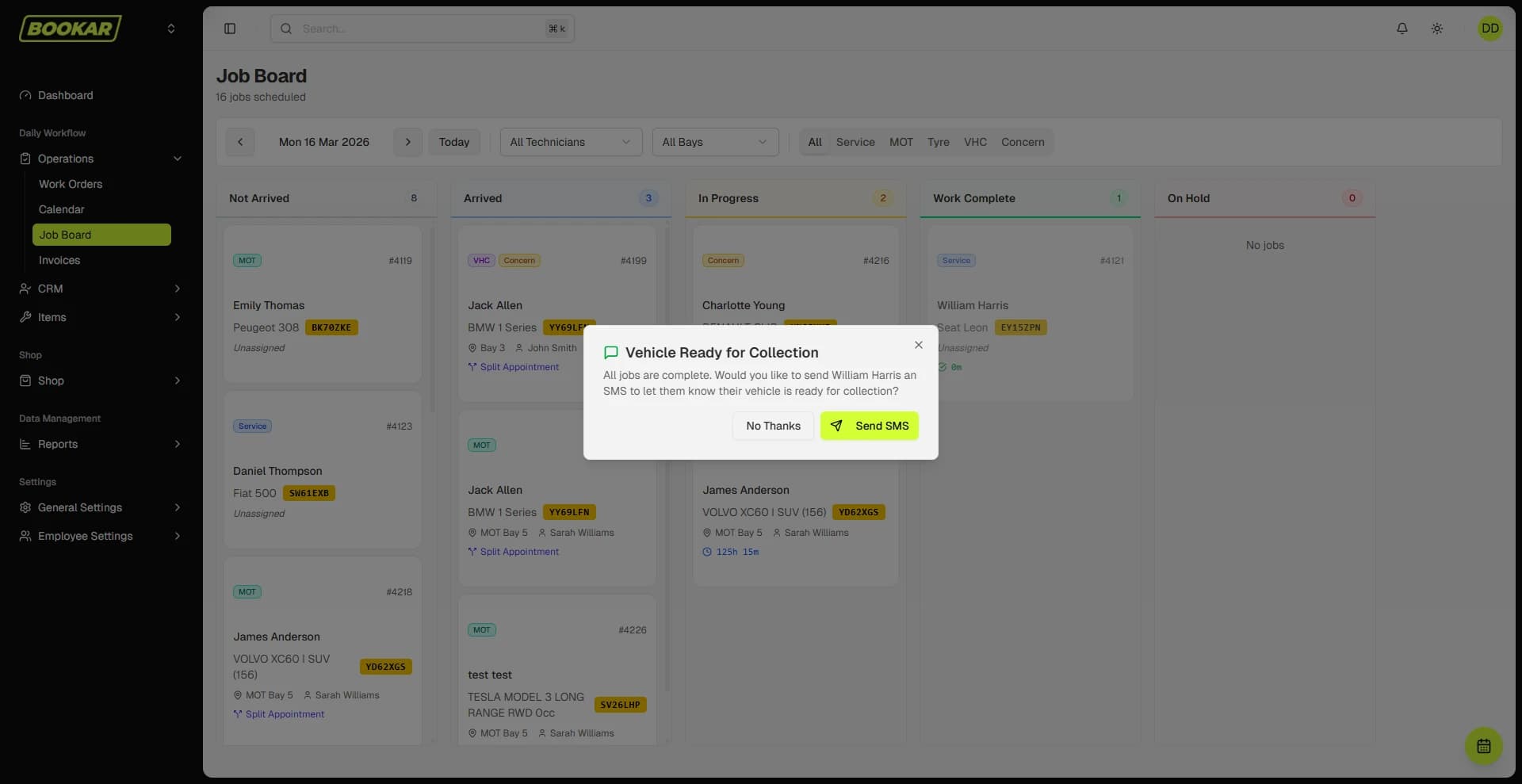
The Job Board shows each technician their queue. A timer runs on one vehicle per technician; the Tracker lists what needs attention — no bay, no key tag, parts not ordered, an authorisation two days unanswered.
- 03
Checked
A digital VHC on a tablet with photos and video, an advisory library, and QC sign-off before it goes out. The customer opens the report on their phone.
Digital VHC - 04
Authorised
An authorisation request by text or email with the evidence attached. You are told when the customer opens it, and the approval or decline is timestamped on the job.
- 05
Priced
Smart Jobs turns "front brakes" into a priced job: the OE labour time at your rate, and the parts priced live from your suppliers. Or pull the OE service schedule for the mileage.
Smart Jobs - 06
Parts ordered
Order from the work order. The purchase order carries the job it is for, goods-in lands the stock on that job, and a part the workshop no longer needs goes back to the supplier from the same screen.
Parts & tyres - 07
Invoiced
Labour, parts and VAT from the work order. Deposits already taken are shown; a job can be billed as one line; the invoice can carry a QR code to pay; Xero or QuickBooks gets it without re-keying.
Invoicing & payments - 08
Paid — and coming back
At the counter, on a Dojo terminal, by a payment link sent by text, or spread with Klarna or Clearpay. The MOT and service reminders for next year are already set.
Reminders & CRM
The front desk and the workshop look at the same day
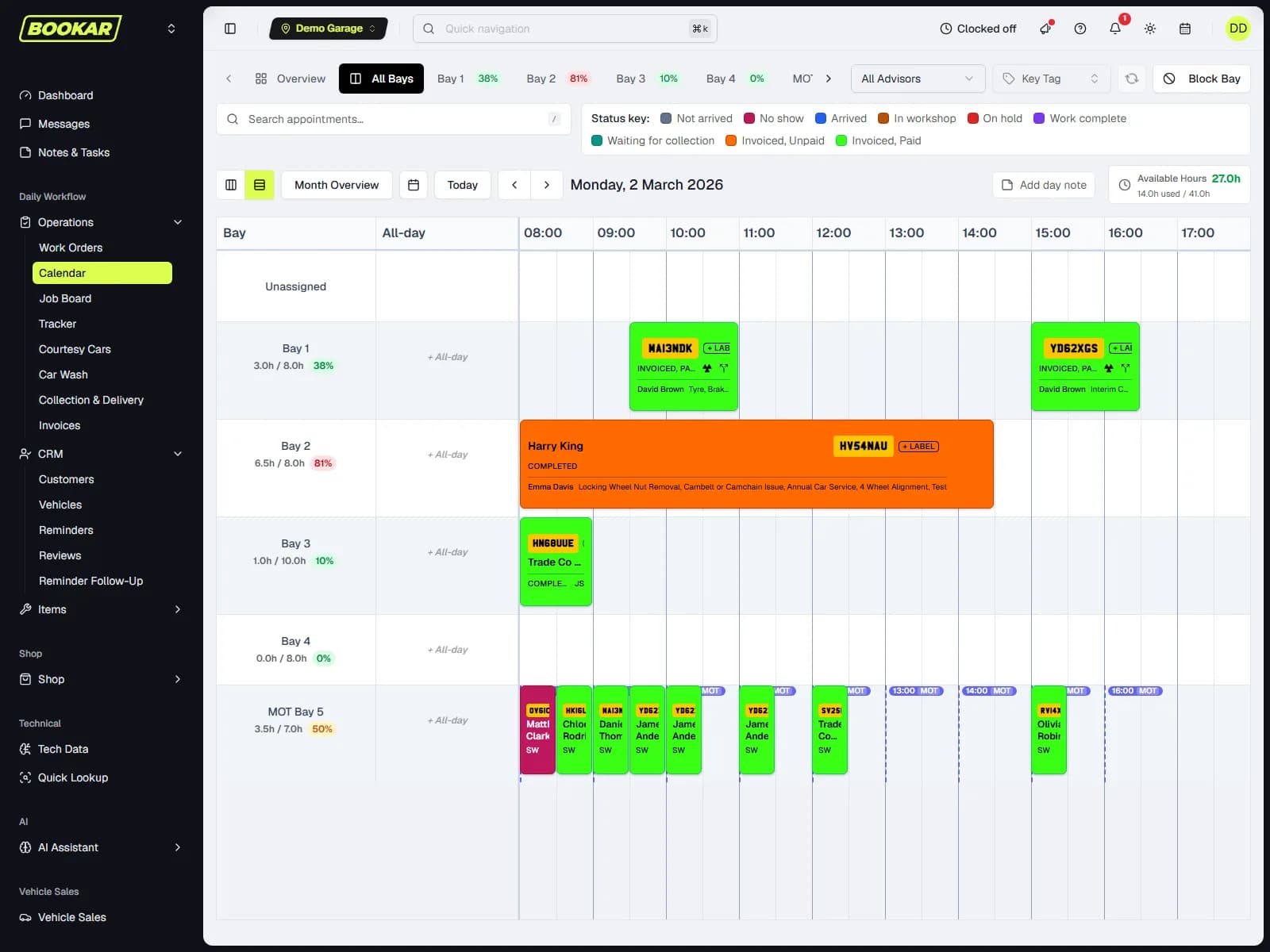
The diary knows how long each job takes, which bays can do it, who is off and which bank holidays are closed. The Job Board shows every technician their queue and every advisor where each car is.
Slots sized by the job
A service is booked for a service's length. A job longer than the day carries over. A specialist bay is not booked for an MOT.
One timer per technician
Starting a job pauses the last one. Reassigning a job takes its clocked time with it. Hours land on the KPI dashboard.
Key tags and the Tracker
Every car on site has a tag. The Tracker lists what is wrong right now — worst first — before anybody asks.
Split appointments
A car in for an MOT and a repair on different days shows both, with a notice on each of what else it is in for.
Type “front brakes”. Get a priced job.
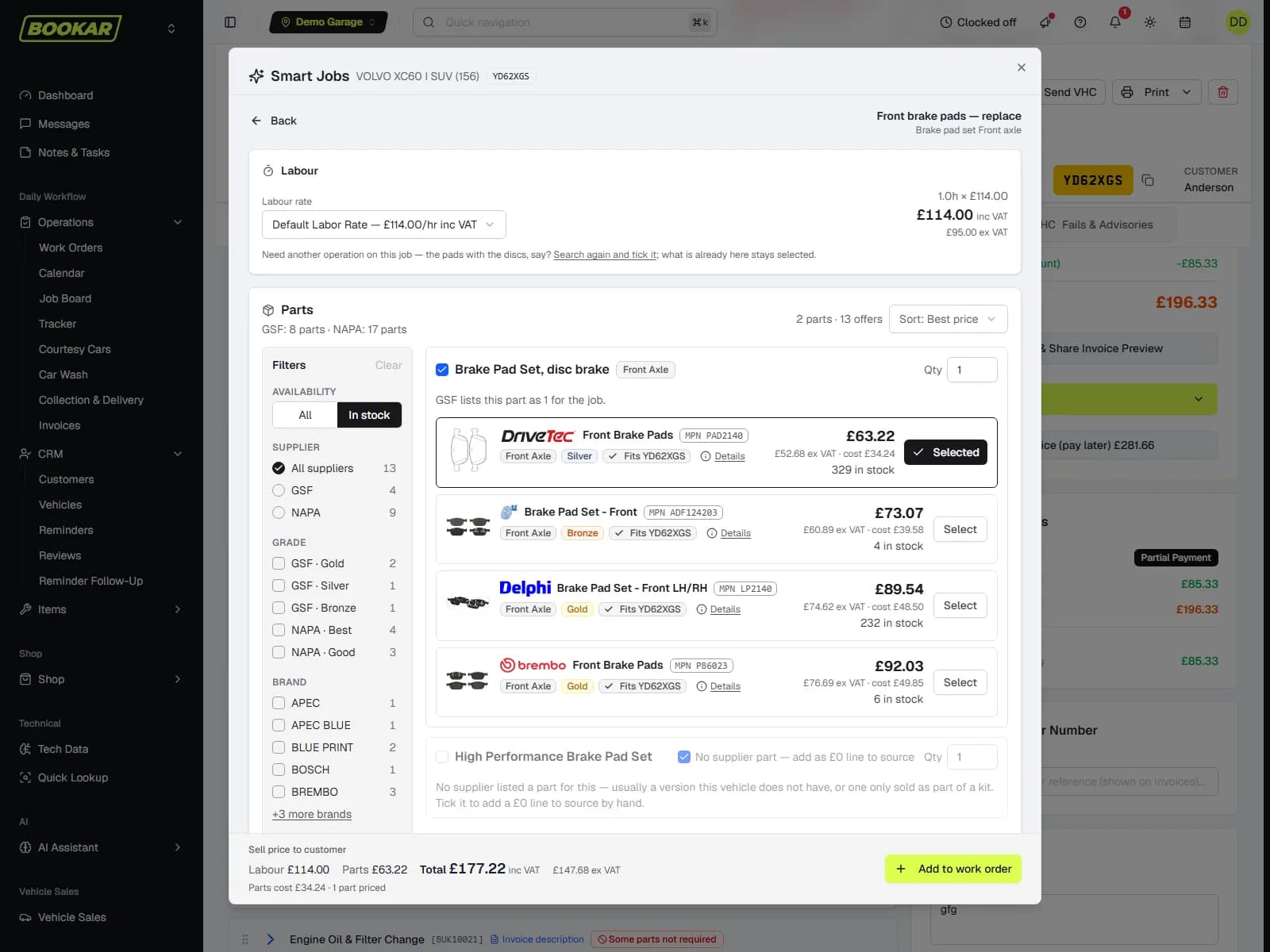
Smart Jobs matches a few words to the vehicle's OE repair operations, takes the manufacturer's labour time at your rate and mark-up, and prices the parts live from GSF or NAPA — filtered by brand, quality tier and stock. The result is one grouped job on the work order, ready to authorise.
- OE labour time for this exact vehicle, at your labour rate
- Parts priced live at your trade price, or the customer's negotiated rate
- The pair for an axle job; pads offered onto a disc job
- "Often done with this" chips add the related work in one click
- Laid out like a parts website — brand, tier, stock and price side by side
Everything the workshop needs, in one login
The modules a garage uses every day, all working from the same work order. Everything here is in the GMS plan unless it is marked add-on.
Diary & calendar
Bays, technicians, multi-day blockouts, bank holidays, and a click on a gap that books the gap.
Job Board & Tracker
Each technician's queue, one running timer per person, and a Tracker that lists what needs attention.
Work orders
Jobs, concerns, inspections, notes, files, activity log, parked jobs for a future visit, and a move to another branch.
Smart Jobs
A priced repair from a few words: OE labour at your rate, parts live from GSF or NAPA.
Vehicle health checks
Your own templates, photos and video, advisory library, QC sign-off, typed signature.
Authorisation requests
Evidence attached, preview before sending, read receipts, timestamped approval.
Parts & suppliers
GSF, NAPA and SES live; purchase orders named after the job; goods-in; returns bin.
Tyres
Grouptyre, Bond and Oak stock and prices by size; tiered mark-up; tyre fitting priced as bay time.
OE data
TecRMI repair times and service schedules inside the work order. Fluids and capacities, wiring and DTCs come with the technical data add-on.
Invoicing & payments
Stripe, Dojo terminal and links, Klarna, Clearpay, deposits, credit accounts, refunds.
Accounts
Debtors with statements on screen, one supplier-invoice ledger, VAT analysis, Xero and QuickBooks sync, Sage exports.
Reporting & KPIs
Labour recovery, hours sold by kind of work, sales year on year, end-of-day sheet, targets.
Staff & clocking
Permissions per button and manager override codes. Clocking on and off with a payroll export is an add-on.
Customers & CRM
MOT and service reminders, two-way messaging, NPS surveys, review requests, fleet drivers.
Stock
Minimum levels per branch, low-stock on the PO page, transfers, non-stock and misc lines.
Courtesy cars & vehicle sales
Add-onCourtesy-car bookings on the diary; a sales stock list with photos.
Collection, delivery & valeting
A driver board with a run sheet. The car-wash board for the valeting bay is an add-on.
Multi-location
Add-onStaff on more than one site, work moved between branches, reports per site or across the group.
Your suppliers' live prices, inside the job
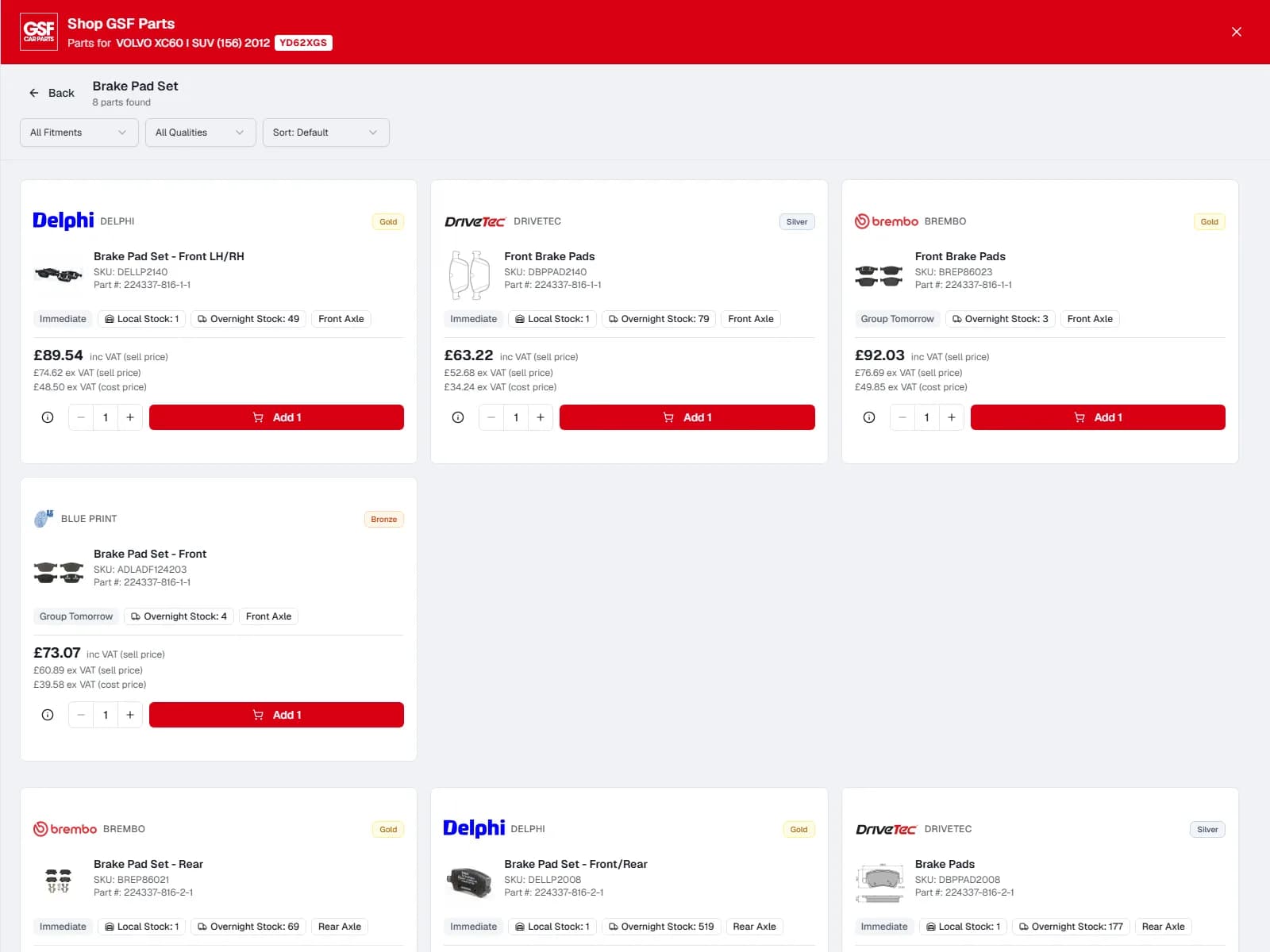
Search by registration and part group. GSF, NAPA and SES return your own trade price and live availability; Grouptyre, Bond and Oak return tyre stock by size. Pick a line and it is on the work order at your mark-up, with the purchase order raised and named after the job.
- The supplier's quality tier stays on the part (Gold / Silver / Bronze, Good / Better / Best)
- Goods-in lands the stock on the job it was bought for
- A part the workshop marks "not required" is flagged at the top of the order and goes back to the supplier from the same screen
- Minimum stock per branch; low stock shown on the purchase-orders page
Fewer phone calls. Faster approvals. Paid before collection.
The four things a customer touches — a message, an approval, a payment and a way to spread it — are built in and logged on the job.
Two-way messaging
Text the customer from the job and their reply lands on the same job. Every message is on the work order, so whoever picks up the phone can see what was said.
- SMS and in-app messaging
- The whole thread on the work order
- Photos and progress updates
Authorisation requests with evidence
Show the worn pad or the split boot before asking for the money. Photos and video go with the request; the customer approves or declines on their phone; you are told when they have opened it.
- Preview before it goes
- Read receipt when the link is opened
- Approve or decline, timestamped on the job
- Sits alongside what was already agreed, so the total is clear
Text to pay
A payment link by text when the job is done. The customer pays on their phone, the invoice is marked paid and the work order catches up — nobody is waiting at the desk.
- Stripe or Dojo, whichever the garage uses
- Invoice marked paid on receipt
- A QR code on the printed invoice does the same
Spread the cost
Klarna Pay in 3 and Clearpay Pay in 4 on the payment link, through the garage's Stripe connection. The customer pays in instalments; the garage is paid in full up front.
- Klarna Pay in 3, Clearpay Pay in 4
- Garage paid in full on day one
- The big job that was going to wait gets done
Manufacturer data where the technician is standing
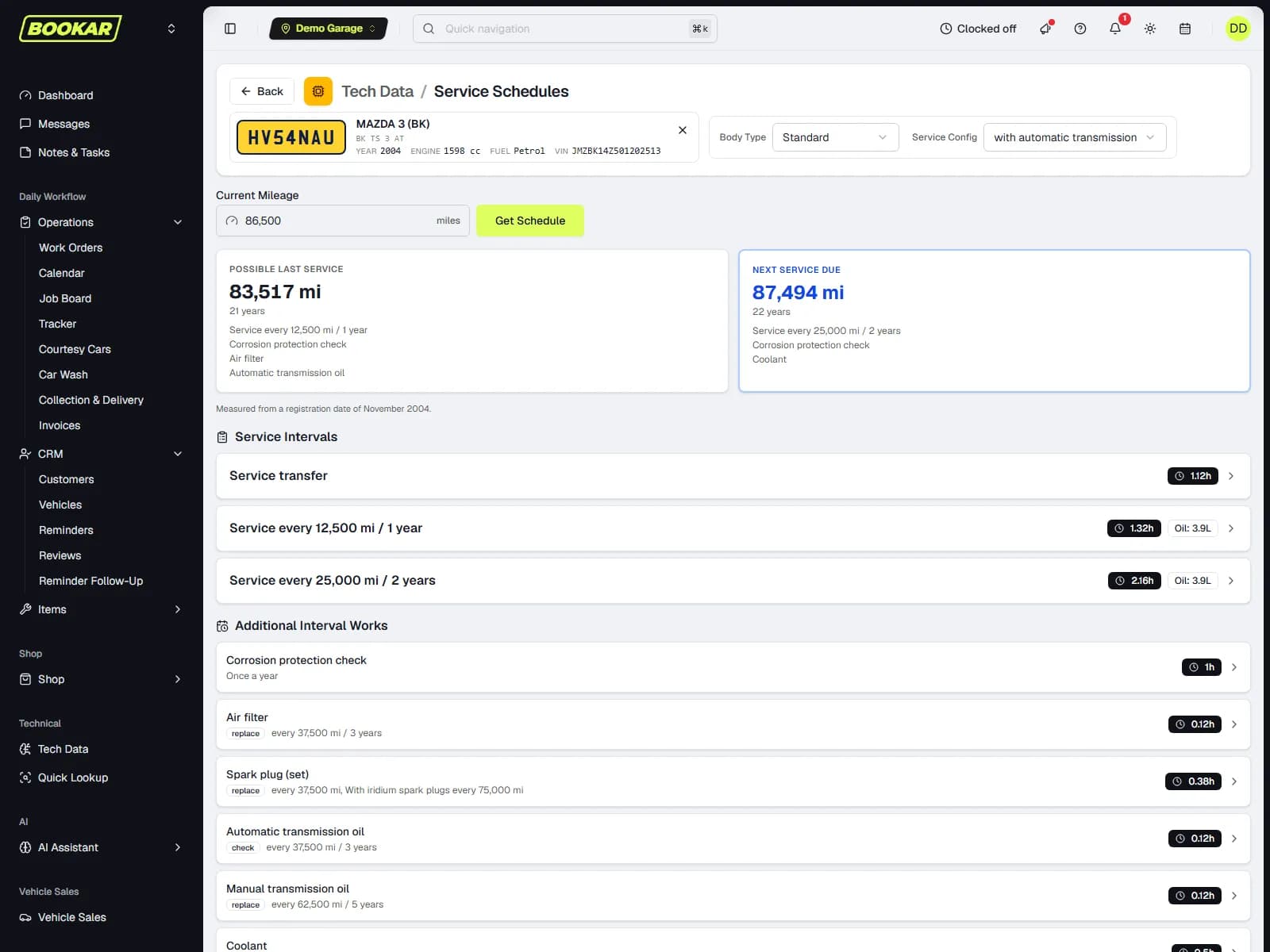
TecRMI repair and maintenance data is inside the work order, not in another tab. Repair times price the labour; the service schedule for the mileage says what is due; the digital service book is filed from the same job.
- Repair times for the operation, at your rate and mark-up
- Service schedules by mileage — what is due, what was probably done last time
- Fluids and capacities
- Wiring diagrams and component locations
- Diagnostic trouble codes
- Fuse and relay assignments
- Manufacturer service book entries filed digitally
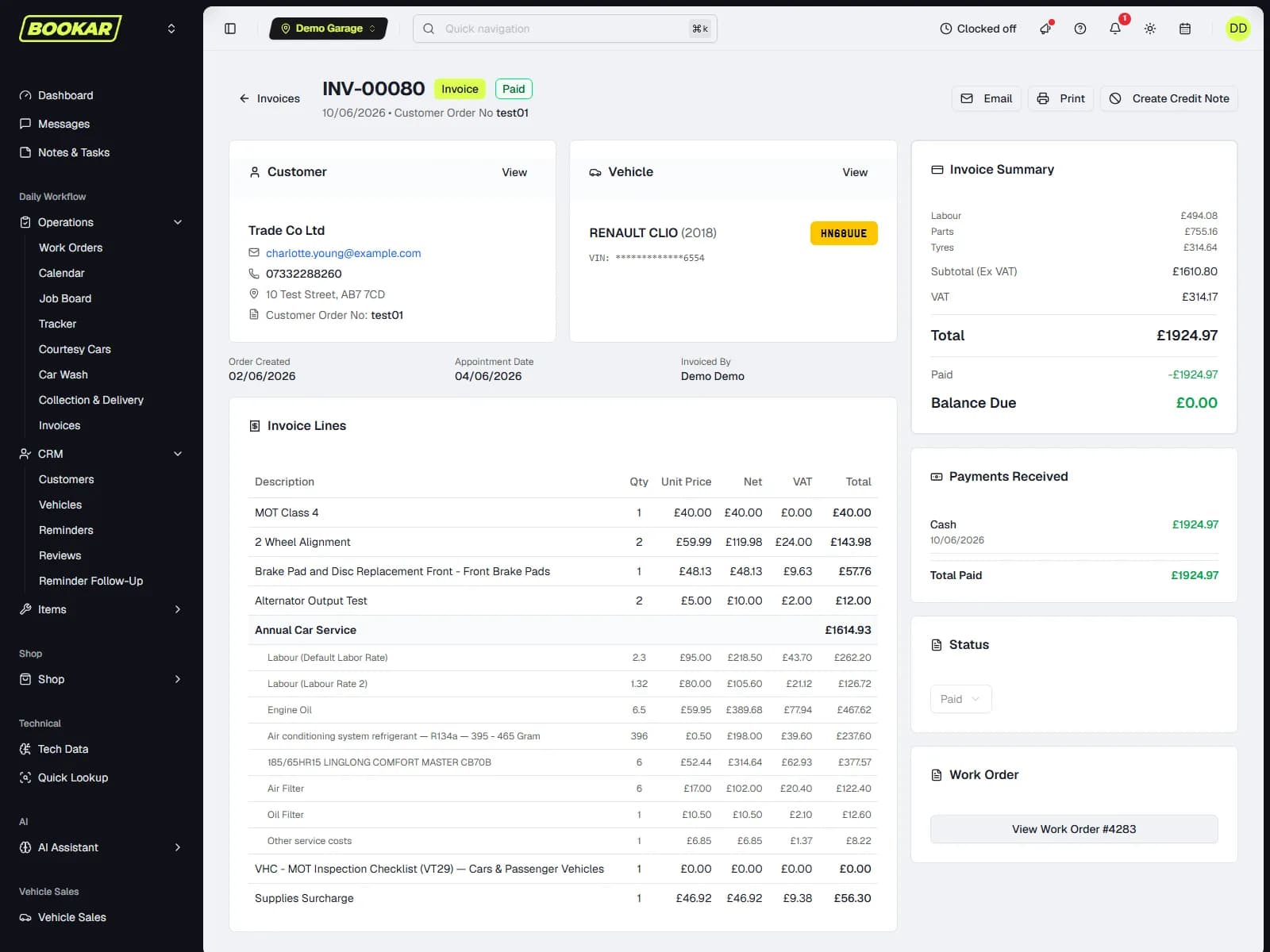
The invoice is the work order, priced
Labour, parts, tyres and VAT come off the job. Deposits already taken are shown. A job can be billed as one line, part numbers and the labour description printed or not, the mileage and the advisor on or off — per garage, not per invoice.
Every way to pay
Counter, Dojo terminal, payment link, Klarna and Clearpay, on account with a credit limit warned about while the job is being built.
Accounts
Debtors with a statement previewed on screen and emailed from the row; one supplier-invoice ledger, scanned or typed; VAT analysis.
Xero, QuickBooks & Sage
Invoices, credit notes and payments post to Xero or QuickBooks Online for the whole business, with one connection for every location. Using Sage? Export files for Sage 50 and Sage Business Cloud.
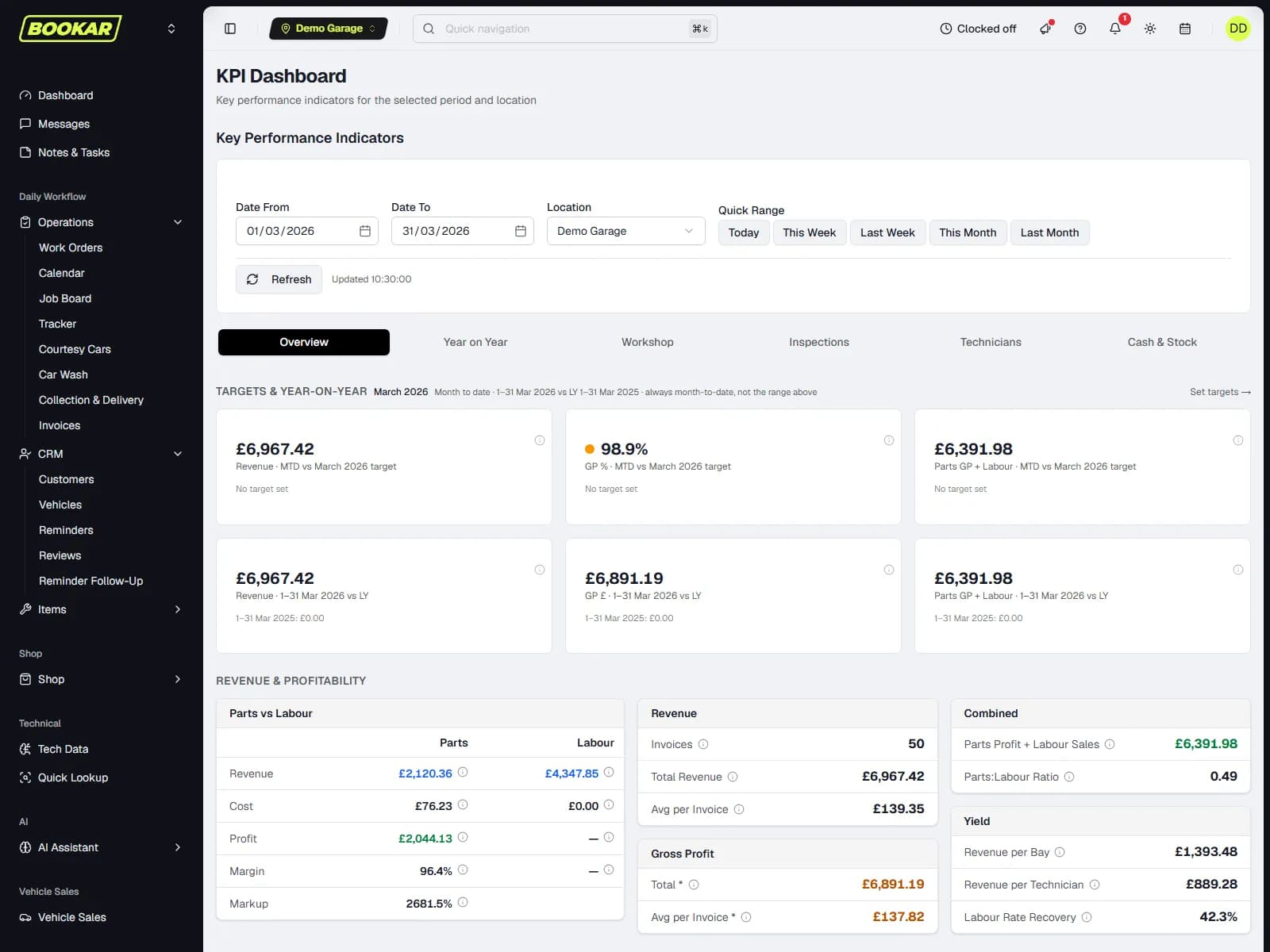
The numbers a workshop actually runs on
Hours available against hours sold, by technician and by kind of work — labour, MOT, inspections, VHCs and tyres — so labour recovery is a real figure, not a feeling. Sales this year against last, an end-of-day sheet for the till, and a management report with a target.
Labour recovery
Hours sold against hours attended, once staff clocking is on. Average labour rate actually achieved.
Technician utilisation
Clocked time on jobs against time on site, per person, with the bonus threshold you set.
End of day
Every invoice and credit note for the day with the payments that settled it, VAT by rate, money through the till by method.
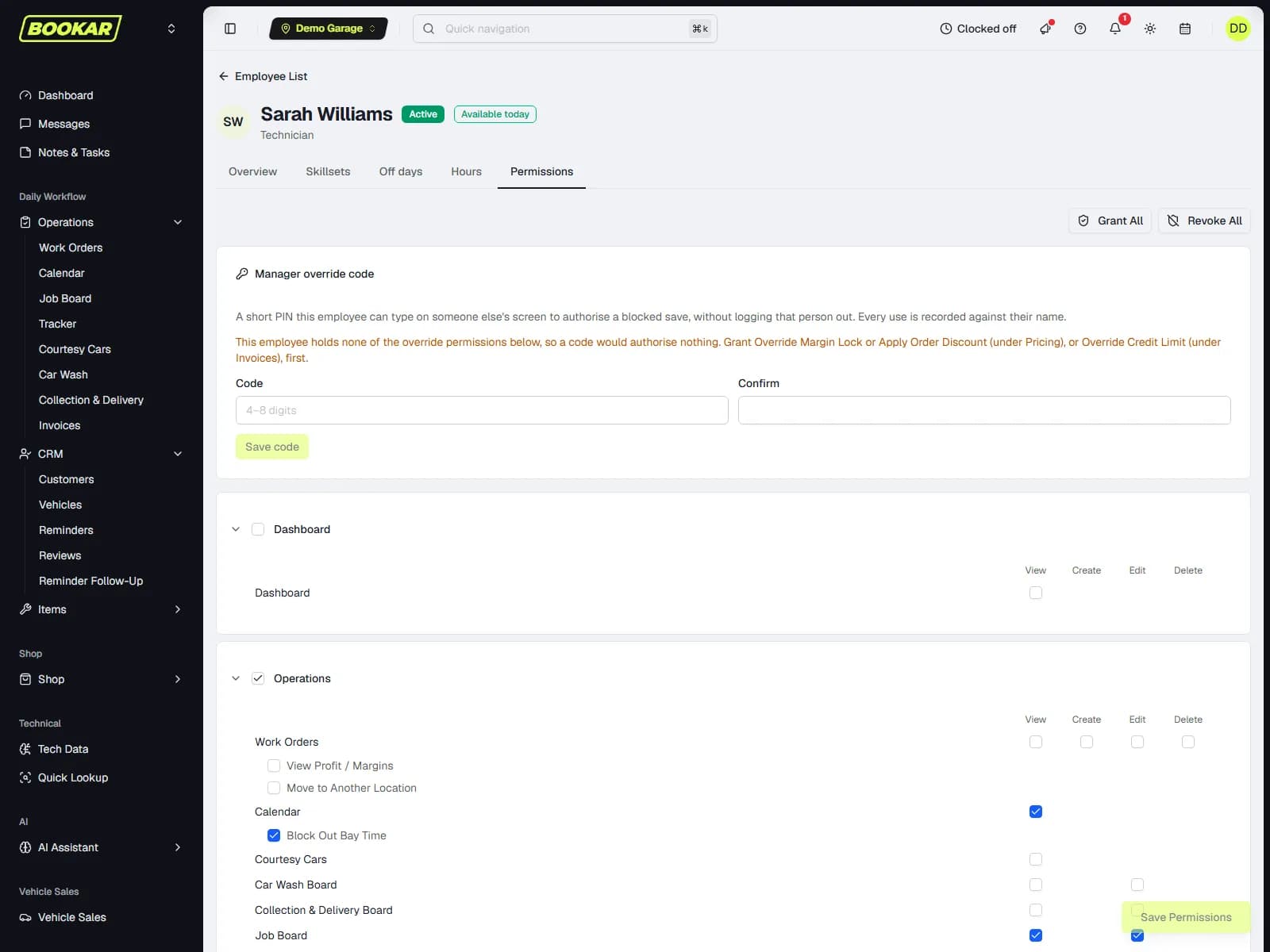
Who can do what, and who was in
Permissions go down to the button — who can add a job, send an authorisation request, apply a discount, override a credit limit. With the Staff Clocking add-on, staff clock on and off in the app header and the hours report exports for payroll. A manager's override code lets the front desk authorise one save without handing over a login.
Roles and permissions
Technician, service advisor, auto electrician, manager — and any permission on or off per person.
Clocking
Clock on, breaks, clock off. Supervisors see who is on site; a payroll file comes off the report.
Override codes
A short PIN that borrows a manager's authority for one save, with the audit entry naming whose code it was.
Getting started
We do the import and the set-up. Your team starts on a diary that already has their customers on it.
- 1
Import
We import your customers, vehicles, service history, suppliers and stock from your current system — we have done it from CRM exports, Business Central and legacy garage software.
- 2
Set up
Bays, technicians, labour rates, your service menu, supplier accounts, card provider and reminder templates set up the way you already work.
- 3
Go live
Your website booking widget, the diary and the job board go live together. Reminders for the year ahead are set from the imported history.
- 4
Tune
The KPI dashboard and the Tracker show where time and money are going; the What's New page inside the app tells you what changed each week.
See it on your own jobs
Book a demo and we will walk a job through BOOKAR from booking to paid — with your parts suppliers, your labour rate and a car off your own diary.
Join Our Newsletter
Subscribe to receive the latest news, updates and software insights, directly to your inbox.