

A receptionist on your website. Bookings straight into your diary.
Most calls to a garage ask the same few things: how much, when can you fit me in, are you open on Saturday. Website Chat answers them on your website, day and night, from your own price list, opening hours and diary. When the customer is ready, it books them in, and the booking lands on your diary like any other.
An add-on to the BOOKAR GMS plan: £29 + VAT a month per website.
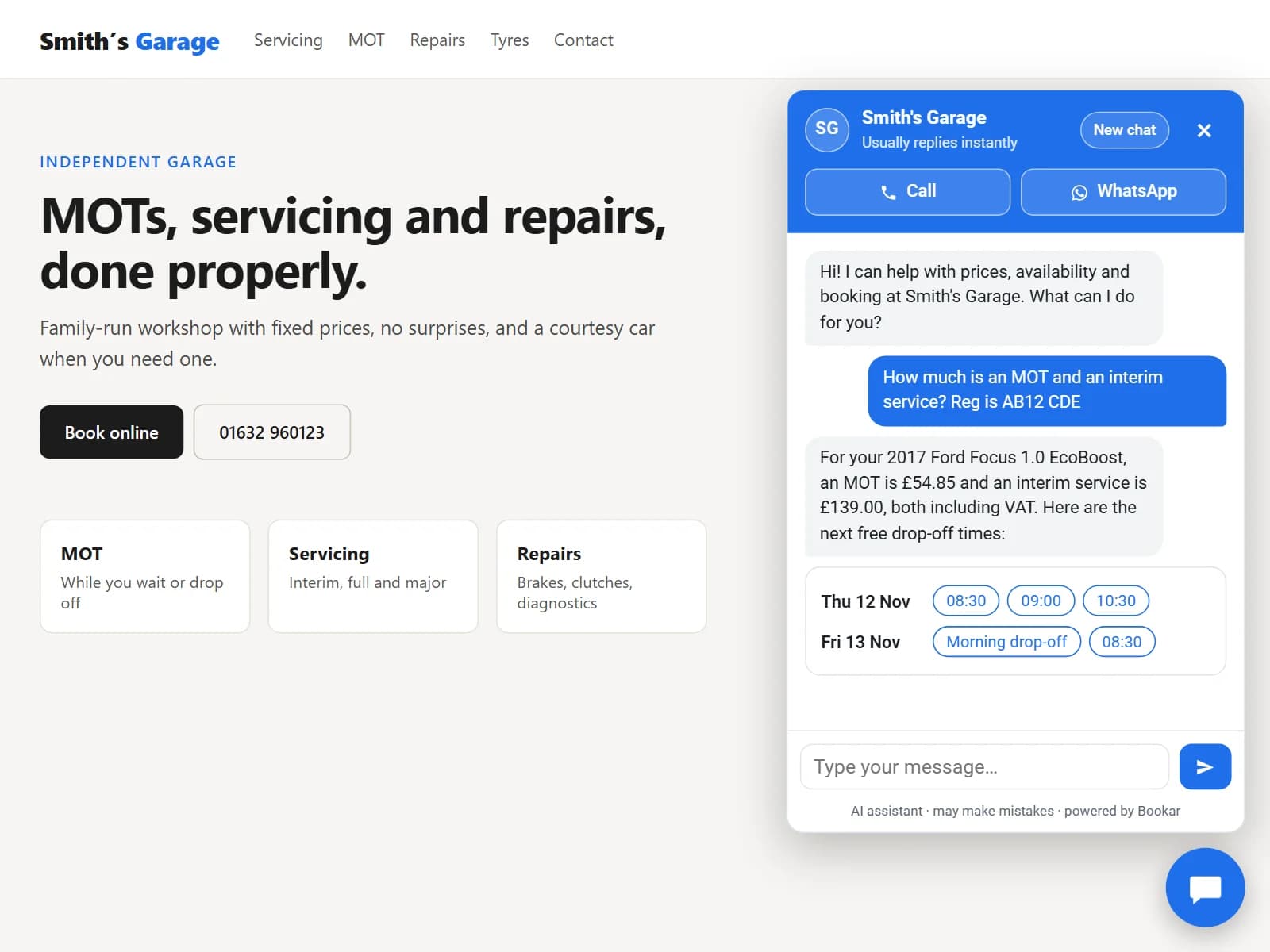
Answers from your own price list and diary
It's built to quote only what BOOKAR knows: every price and time comes from your price list, your diary or what you've told it, not from a guess. If it can't answer, it says so and offers to take a message.
Prices from your price list
It quotes the services you've priced in BOOKAR, including VAT. Where servicing depends on the car, it asks for the registration and looks the car up first.
Times that are really free
It checks your diary and offers a few times that are free, at the location the customer wants.
Opening hours and locations
It knows your hours and every location that takes bookings, and asks which one suits.
Anything else you tell it
Add what isn't in BOOKAR, like courtesy cars, warranty, parking or work you don't do, and it answers from that too.
What visitors ask, and where the answer comes from
How much is a full service on AB12 CDE?
Your price list, for that car
Can you fit me in on Saturday morning?
The free times in your diary
What time do you close today?
Your opening hours
Do you do courtesy cars?
What you've told it
There's a grinding noise when I brake.
No guessing: it suggests booking an inspection
- Short, friendly replies in plain UK English
- A price for a repair you haven't seen is given as a guide, to be confirmed once the car is in
- Stays on the subject of your garage and the customer's car
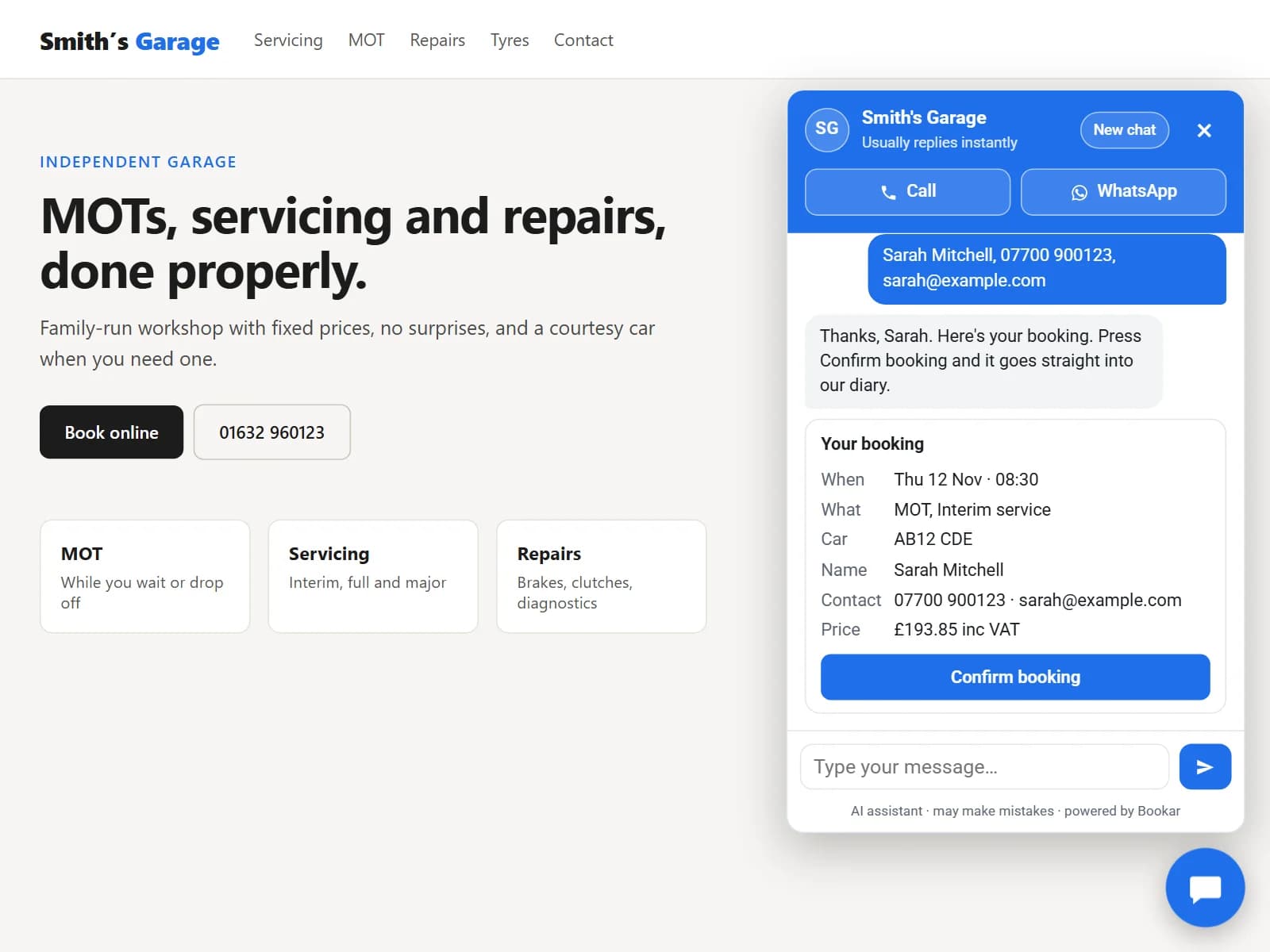
Books them in, with the customer's say-so
Once the customer has picked a time and given their name, mobile and email, the chat shows the booking for them to check.
- 1
It shows the booking
The services, the car, the day and time, the location, their contact details and the price, on one card.
- 2
They press Confirm
Nothing is booked until they do, and only the booking on the card can be made.
- 3
It's in your diary
The booking lands on your diary like any other online booking, marked Website Chat, and the customer gets a confirmation by email.
Messages taken for you
When someone wants a call back, or needs a person for a complaint, insurance work or a car already with you, it takes their details and emails the location.
Rather ring them yourself?
Switch booking off and the chat quotes and shows free times, then takes their details so you can call them back.
Call or WhatsApp in one tap
Buttons at the top of the chat ring or message the location the customer is asking about. The WhatsApp button shows when you use BOOKAR WhatsApp.
Existing customers can check their own bookings
Turn on customer checks and a customer can ask about their own booking or car. The chat sends a 6-digit code to the mobile or email you hold for them, and once they type it in, it can:
- Show their upcoming bookings
- Move or cancel a booking, on a card they confirm, just like a new booking
- Tell them whether their car is ready
- Tell them when the MOT and service are due, and what work is still to do, with prices
Private by design
The chat replies the same way whether or not the details match, so it never gives away who is a customer. It never sees invoices or payments.
One text per check
Each code sent by text is charged at the normal text message rate. With customer checks off, the chat gives your phone number for existing bookings instead.
Smith's Garage
Usually replies instantly
Can I move my MOT to Friday? It's AB12 CDE, 07700 900123.
Check it's you
If your details match ours, we've sent a code to the mobile or email we hold.
482 913
Verified ✓Move your booking
- From
- Thu 12 Nov · 08:30
- To
- Fri 13 Nov · 09:00
- What
- MOT
- Car
- AB12 CDE
Move booking
Safe to leave running on your website
It works while you're under a car or at home in bed, so it is built to stay inside the lines you set.
Only on your website
The chat runs only on the website addresses you give us, so nobody can put it on another site.
Nothing booked without Confirm
The AI can suggest a booking. Only the customer pressing Confirm makes it.
No made-up prices
Prices and times come from BOOKAR or from what you've told it, and BOOKAR itself works out the price on the booking card.
Clearly an AI
The chat says it's an AI assistant that may make mistakes, and Call and WhatsApp are always a tap away.
No surprise bills
Limits on every chat and a monthly allowance in the price, so a busy month never brings a surprise bill.
Every chat on record
Read every conversation in BOOKAR, with anything it booked and any message it took.
Settings · Website chat
41
Chats started
12
Bookings
7
Messages taken
5
Customers checked
Show the chat on my website
Let customers book in the chat
Let customers check their bookings
Pop the first message up beside the chat button
Things it should know
Courtesy cars must be booked a week ahead. 12-month parts and labour warranty. We don't do bodywork.
You decide how it behaves
One page in BOOKAR GMS turns the chat on, sets what it may do, and shows how it's doing.
Your colour and your words
Pick the chat's colour and write its first message. Your garage's initials sit in the header.
A gentle nudge
A few seconds into a visit, the first message pops up beside the chat button. Once per visit, and easy to close.
Where messages go
To each location's email, or to one address you choose.
This month at a glance
Chats started, bookings made, messages taken and customers checked, with the allowance used.
Read every chat
Everything said in the chat, newest first.
On any garage website
A small chat button in the corner of every page, on your BOOKAR website or any other.
Your BOOKAR website
If we built your website, we switch the chat on for you. There's nothing to install.
Any other website
Paste one line of code into your site, or send it to whoever looks after your website.
Phones and computers
A chat window in the corner on a computer, and full screen on a phone.
Several locations
It asks which location suits, and Call and WhatsApp follow the one the customer picks.
Common questions
How much does it cost?
£29 + VAT a month per website, as an add-on to the GMS plan. Codes for customer checks sent by text are charged at the normal text message rate. Everything is on the pricing page.
Can I try it?
Yes. Our demo garage's website has the chat in the corner, running on a demo BOOKAR account. Ask it for a price, or book a time and press Confirm: bookings there go into the demo diary, not a real garage's. Try the live demo
Is there a limit on chats?
The price includes a monthly allowance that is far more than a typical garage uses, and Settings → Website chat shows how much of it has gone. If it ever ran out, the chat would ask visitors to ring you until the next month.
Will it make mistakes?
It answers only from your price list, your diary and what you've told it, and says so when it doesn't know. Like any AI it can still get something wrong, which is why the chat says it's an AI assistant, and nothing is booked until the customer has checked the details on the card and pressed Confirm.
Do I need a BOOKAR website?
No. It works on any website. Paste one line of code into your site, the same way as the BOOKAR booking widget.
What happens out of hours?
It carries on answering, quoting and booking into free times. Any messages it takes are in your inbox in the morning.
Can customers talk to a person?
Yes. Call and WhatsApp buttons sit at the top of the chat, and it takes a message whenever someone would rather you rang them back.
Can I read the conversations?
Yes. Every chat is in Settings → Website chat, newest first, along with anything it booked and any message it took.
Is it on the Online Booking plan?
Not at the moment. Website Chat is an add-on to the GMS plan.
See Website Chat answer from your own price list
Book a demo and we'll show you a customer asking for a price, picking a time and booking in, and the booking arriving on your diary.
Join Our Newsletter
Subscribe to receive the latest news, updates and software insights, directly to your inbox.