Every piece of software seems to have “AI” on the box this year, garage software included. Some of it is useful. Some of it is a chatbot bolted onto the side of a product. And some of it would be risky in a workshop, where a made-up labour time or a misread invoice costs real money.
This is a plain guide to where AI earns its place in a UK independent garage today, where it does not, and what to ask before you pay for it.
The rule that separates useful AI from risky AI
AI is good at understanding what someone means and at reading messy information. It is bad at knowing facts it has not been given. A general-purpose chatbot asked for the labour time on a cambelt will give you a confident number, and that number may be wrong.
So the tools worth having follow one rule: the AI picks and reads; your data decides. Labour times come from the manufacturer's data. Prices come from your price list and your suppliers. Answers about your business come from your own records. The AI turns a few words into the right lookup, or turns a photo of an invoice into lines, and then a person checks the result.
Where AI genuinely helps today
Turning a few words into a priced job
A customer rings and asks what front brakes will cost. Normally that means looking up the repair time, finding the parts, checking stock at two suppliers and adding it all up. AI is good at the first step: understanding that “front brakes” on this car means a particular set of repair operations.
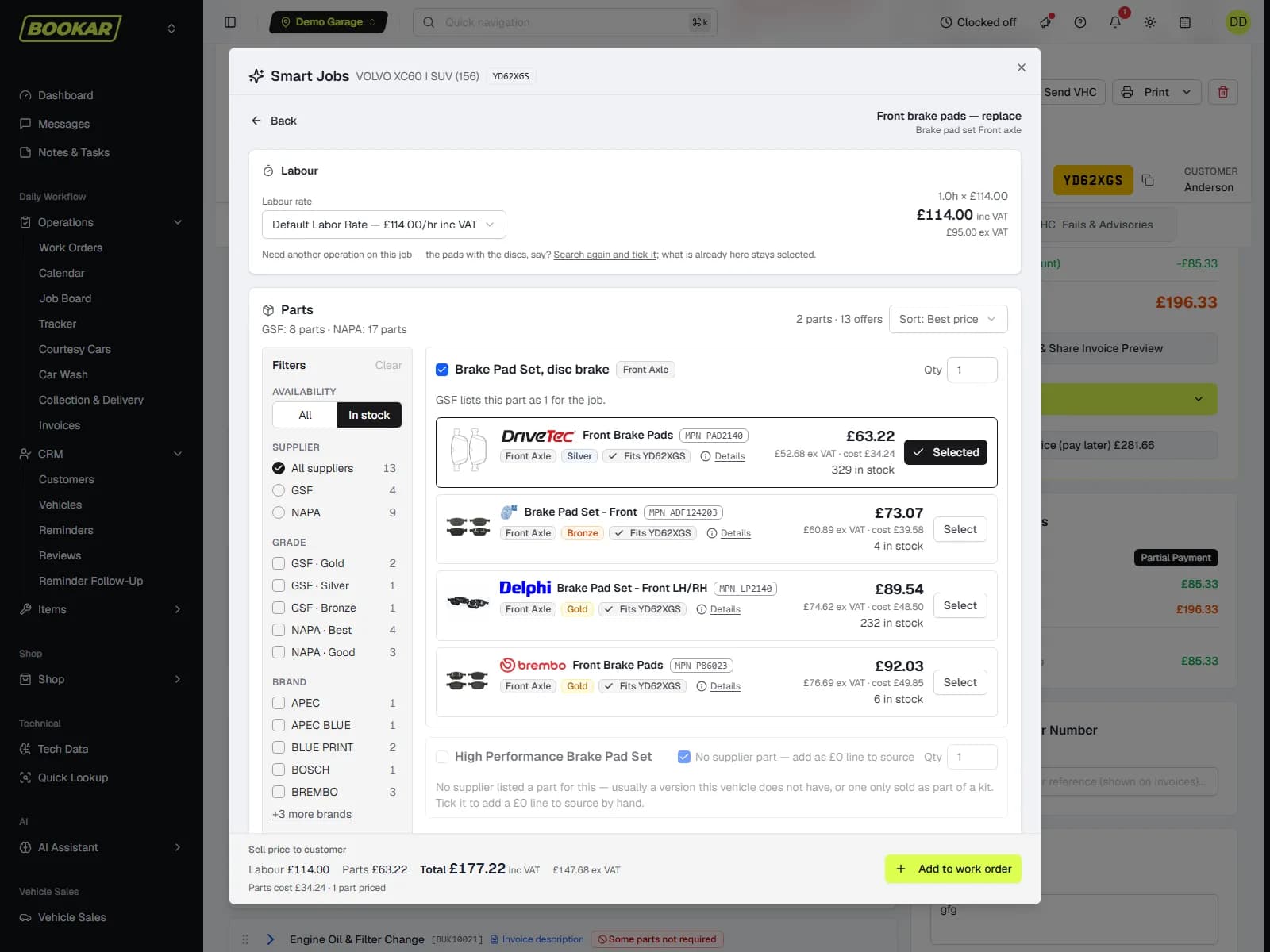
BOOKAR's Smart Jobs works like this. You type a phrase, it picks from the repair operations TecRMI lists for that exact vehicle, prices the labour at the manufacturer's time and your rate, and prices the parts live from your suppliers. It shows you the matches and you choose. Nothing goes on the work order until you add it, and every line can be edited afterwards.
Reading paperwork so nobody has to type it
Supplier invoices, credit notes and delivery notes are a daily chore and a common source of mistakes. Reading a PDF or a photo and pulling out the supplier, invoice number, dates, totals and every line is a job AI does well, provided someone checks what it read before it is saved. That last part is not optional, and any supplier who says otherwise is overselling.
Answering questions about your own business
Most garage owners have questions their reports do not quite answer. Who owes us the most? What did we take last month? Which technician clocked the most hours in August? Finding out usually means opening three reports and a spreadsheet.
An assistant that can read your records answers those in plain English, with the figures, a table or a chart. The useful ones show which records they read, so you can check the working. BOOKAR's AI Assistant does this, and an answer you will want again can be saved as a report and emailed to you daily, weekly or monthly.
Spotting what a checklist cannot see
Rules can tell you a car has no key tag or a job has no technician. They cannot read a note that says “customer mentioned a knocking noise” on a car booked in only for an MOT. Reading free text for things that need a decision is a good use of AI, as long as it flags things for a person rather than acting on them.
What AI cannot do, and should not be asked to
- Diagnose a car. It cannot hear the noise, feel the vibration or see the corrosion. It can look up what a fault code means in the manufacturer's data. That is a lookup, not a diagnosis. The technician still diagnoses.
- Invent prices or times. If a tool cannot tell you where a labour time or a parts price came from, do not put it on a quote.
- Be trusted without checking. Scanning gets a line wrong now and then. Matching a phrase to a repair operation occasionally needs a second look. Good tools make checking quick. They do not pretend it is unnecessary.
- Change records on its own. An assistant that can edit invoices or send messages without a person pressing a button is a risk you do not need. Reading is enough for almost everything.
- Replace the conversation with the customer. Customers authorise work because they trust the person explaining it. AI can draft the quote. It should not be the one asking for the money.
Questions to ask before you pay for AI
- Where do the numbers come from? Manufacturer data, your price list, your records, or the model itself?
- Can it change anything, or only read? If it can create a work order, who has to press the button?
- Who can use it, and does it respect the permissions each member of staff already has?
- Is your data shared with other garages or used to train outside AI models?
- Can you see which records an answer was based on?
- Is it included in your plan, or an add-on, and what does it cost per month?
These belong on the same list as the questions in our guide to choosing a garage management system.
How BOOKAR answers those questions
BOOKAR's AI tools are built into the GMS and work only from your garage's own data. Labour times come from TecRMI, prices from your suppliers and your own price list, and answers from your own records. Nothing is shared between garages or used to train outside AI models.
The AI Assistant only reads. It cannot change a record or send a message. Ask it for a quote and the answer can carry a button that raises the work order, but nothing is raised until you press it, under your own permissions. It starts switched on for the business owner alone, who decides who else gets it, and each person only gets answers from the parts of the system they can already open.
Smart Jobs is part of the GMS plan. The AI Assistant and document scanning are add-ons, with current prices on the pricing page.
The short version
Use AI where it reads and picks: quoting from a few words, reading paperwork, answering questions about your own figures. Keep people in charge of anything that costs money or talks to customers. Be sceptical of any tool that cannot show its working.
AI that works from your data, not guesswork
Smart Jobs, the AI Assistant and supplier invoice scanning, built into BOOKAR GMS.